


When sending emails to bulk addressees, the addresses should be included as a Blind copy, in the Bcc line. The easiest way to do this is to put your own email in the “To” line and put the addressees in the Bcc line. In some email systems e.g. Outlook, you need to open up the Global Address List (GAL) to find the Bcc line. Select the “To” or “Cc” button, to open the menu.
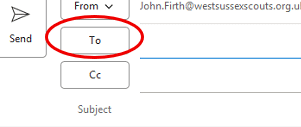
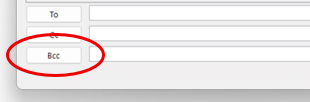
Once you have entered one email address in the Bcc line in the GAL, you can close it and the Bcc line will show in the email header.
As a rough guide to when to use “To” and when to use “Bcc”, if you are emailing a small group on a specific subject, use “To”; if it is a bulk distribution such as advertising or coordinating an event use “Bcc”. Additional considerations would be, if you are emailing to personal email addresses (@hotmail.com, @gmail.com, etc) or if young persons are on the distribution. @westsussexscouts.org.uk email addresses can be visible. If in doubt, use Bcc.
The County Data Lead can be emailed here for further advice.


